Interpreters cost a lot and are hard to book
Simultaneous interpreters usually work in pairs for each language and get booked weeks ahead. Hardly anyone does that for an evening event. So everything stays in one language.
Technical preview · own hardware
Lumeya Translate interprets your meeting live: German, English or العربية. If someone already speaks your language, they simply hear you. In our measurements, translation started within 1.4 seconds for 95% of sentences.
 Translate
Room evening-3-languages
Example
 Language panelGuest
HostWelcome, great to have everyone here.
Willkommen, schön, dass alle da sind.
Sound familiar?
Simultaneous interpreters usually work in pairs for each language and get booked weeks ahead. Hardly anyone does that for an evening event. So everything stays in one language.
People who read along are looking at their phones, not at you. Their questions come too late, or never.
If you can't follow everything, you don't speak up. Good ideas get lost, and nobody even notices.
Every meeting where someone only gets half of it costs you a little trust. Next time, that person shows up less often, asks fewer questions and stays on the sidelines.
What happens behind the scenes
The moment you finish a sentence, it runs across our desk. All models work on our own graphics card, nothing goes to a cloud AI.
Two modes, one piece of software
Three steps
As the organizer, you open a room with your key and get a link.
Guests open it in their browser, type their name and choose their language, just like in the picture.
Start the translation and speak. The models take a moment to load, then everyone hears their own channel.
During the preview we email it to you. Guests don't need one. We only use your address to reply (privacy policy, in German).
Request a key by email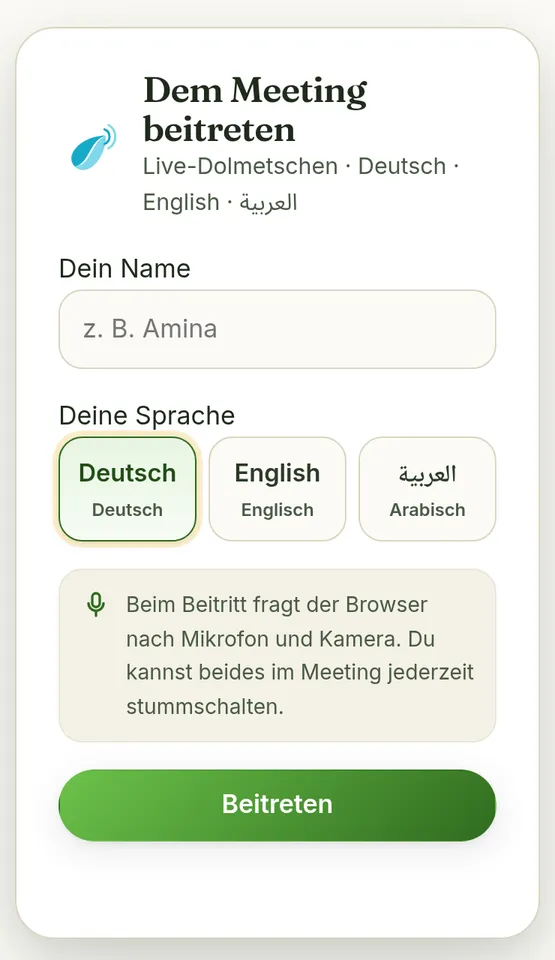
Measured, not estimated
For 95% of sentences, the translation started within this time after the sentence ended. Browser over the internet, 14 language pairs, 28 sentences.
Continuous run with three target languages at once: 1,080 translated sentences, no errors, no growing backlog.
Speech recognition, translation and voice all run on our own graphics card (RTX 3080 Ti).
Measured on October 13 and 14, 2026 on our server. Software time from the end of each sentence, excluding network and speakers.
What it costs
During the preview you pay nothing. No subscription, no credit card, no fine print.
€93 is the statutory hourly rate German courts pay interpreters (Section 9(5) JVEG, as of 2026). Freelance rates are often higher, and simultaneous interpreters usually work in pairs. Just an example calculation, not a quote.
Languages
Every supported language works for speaking and for listening. Hover over the table: wherever speaker and listener share a language, there's no AI involved.
RomanianРусский
Every new language has to clear the same bar for voice and speech recognition as the three you can use today.
| Speaker / listener | DE | EN | AR |
|---|---|---|---|
| Deutsch | original | translated | translated |
| English | translated | original | translated |
| العربية | translated | translated | original |
Privacy
Where it runs
Online meetings on speak.lumeya.ai
PreviewApple Silicon, M1 to M4, tuned for each chip
Coming soonTuned to the graphics card in your machine
Coming soonYour phone as the microphone for in-person events
Coming soon
Picture this
You stand at the front and talk the way you always do, in English. In the second row, someone hears you in Arabic. Next to them, someone hears you in German. Nobody is staring at a phone to read along. Everyone laughs at the same moment. And when it's over, people stick around, because they caught every word.

Lumeya Translate comes from the same workshop as Lumeya Call and Lumeya Web. Our rule: conversations don't belong in someone else's AI cloud. That's why the translation runs on our own graphics card, and why this page only shows numbers we measured ourselves.

Question not listed? Write to Youns directly: office@luminantmind.com
The preview on speak.lumeya.ai is free. For comparison, German courts pay interpreters €93 per hour (Section 9(5) JVEG). No subscription, no credit card.
No. For an online meeting, a current browser with a microphone or speakers is all it takes. Guests don't need an account, just the link.
In our measurements, translation started within 1.4 seconds of the end of the sentence for 95% of sentences. Network and speakers add to that. Lumeya Translate waits until a sentence is finished so the meaning comes out right.
Romanian and Russian are next. We only add a language once its voice and speech recognition clear our bar.
Lumeya Translate is made by Luminant Mind e.U. in Vienna, the team behind Lumeya Call and Lumeya Web.

Try the preview now. Want a room of your own? Drop us a line and we'll send you a key.